English
 Arabic
 French
 Spanish
 Portuguese
 Deutsch
 Turkish
 Dutch
Dutch
 Italiano
 Russian
 Romaian
 Portuguese (Brazil)
 Greek
Greek
US Glycerin Market Demand, Competitive Landscape & Forecast
Other |
2026-07-24 10:26:35
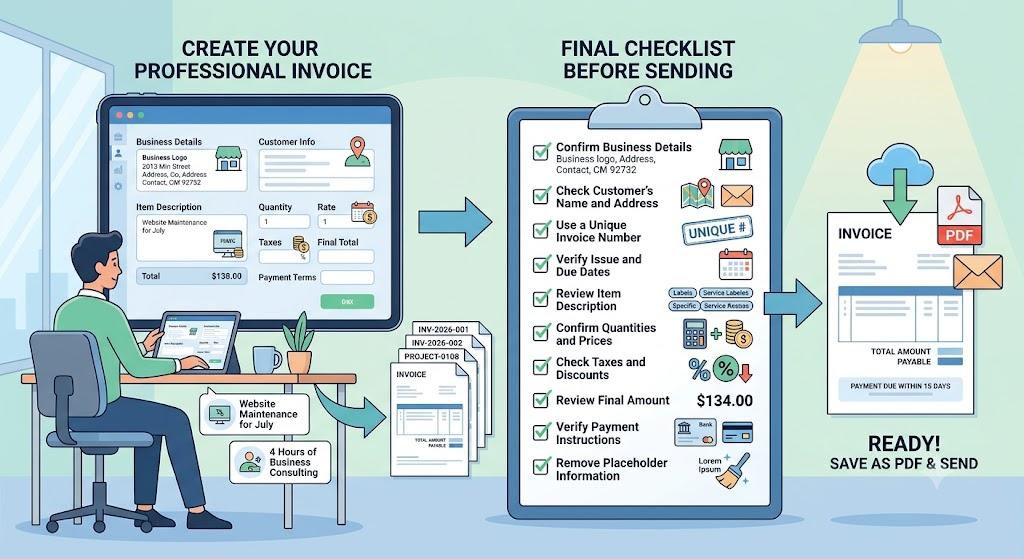
You can create a professional invoice by entering your business details, customer information, products or services, prices, taxes, and payment terms into a structured online form. A free invoice builder makes this process faster by organising the information clearly, calculating totals, and producing a document that is ready to review and download.
A complete invoice should help the customer understand the transaction without asking additional questions.
Include these essential details:
The invoice number should be different for every transaction. A consistent sequence helps businesses track payments, locate previous records, and avoid confusion between customers.
Simple formats may include:
Descriptions should also be specific. Avoid general phrases such as “work completed” or “services provided.”
Use clearer wording, such as:
Clear descriptions help customers compare the invoice with the original proposal, timesheet, contract, or purchase order.
Check every customer, service, pricing, tax, date, and payment detail before sending the document. A final review can prevent incorrect totals, duplicate invoice numbers, unclear descriptions, and payment delays.
Use this checklist:
The total amount and payment deadline should be easy to find. Use specific terms such as “due on receipt” or “payment due within 15 days” instead of vague phrases like “pay soon.”
Save the completed invoice as a PDF. PDF format preserves the layout and makes the document easy to email, download, print, and store.
Yes. An online tool can help you organise billing details, calculate totals, add payment terms, and download a professional invoice.
Yes. PDF is usually the best format because it keeps the layout fixed and is easy for customers to open and store.