English
 Arabic
 French
 Spanish
 Portuguese
 Deutsch
 Turkish
 Dutch
Dutch
 Italiano
 Russian
 Romaian
 Portuguese (Brazil)
 Greek
Greek
Enterprise Data Quality Management Services | UnivDatos
Other |
2026-07-23 15:15:17
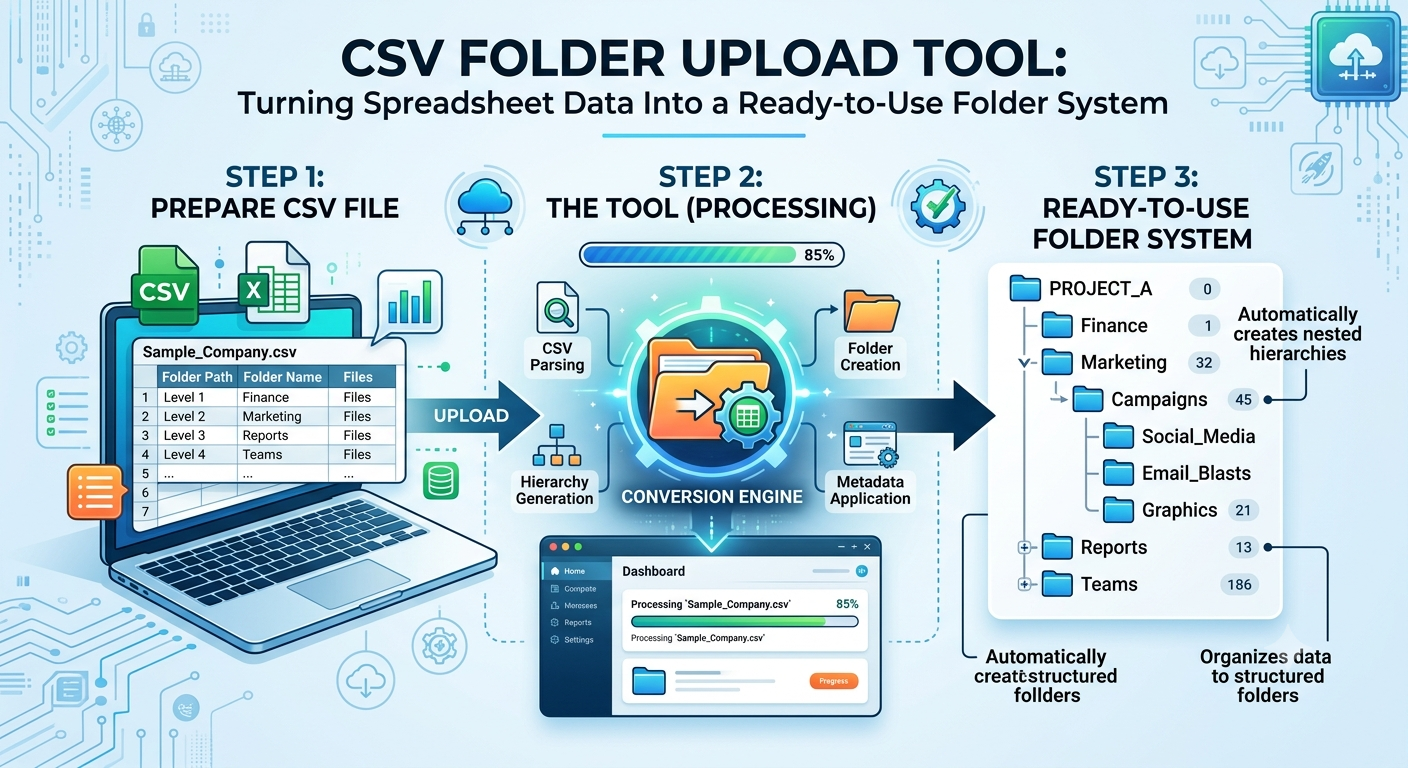
When businesses handle dozens or hundreds of projects, creating folders manually can quickly become repetitive. A typical project may require folders for contracts, invoices, images, reports, marketing materials, client information, and final deliverables. Repeating the same setup for every project takes time and can lead to inconsistencies.
A structured approach can make this process much easier. Instead of creating every folder individually, teams can first define the required structure in a spreadsheet and use that information as a blueprint for folder creation.
Spreadsheets are already familiar to most teams. They make it easy to list projects, departments, clients, or other categories in rows and columns. This information can then describe how folders should be arranged.
For example, a company managing multiple clients could define a structure with a main client folder followed by subfolders for contracts, financial documents, creative assets, and completed work.
This approach separates planning from execution. Employees can review the structure before folders are created, reducing the possibility of missing important sections.
Manual folder creation becomes especially difficult when the same structure must be repeated. Imagine setting up folders for 50 clients. Even if each client requires only eight folders, hundreds of individual folders may need to be created.
A CSV folder upload tool can simplify this process by allowing a predefined structure to be represented in a CSV file. Instead of repeatedly clicking through a cloud storage interface, users can prepare the structure once and use it for multiple folder creation tasks.
The benefit is not simply speed. Standardization is equally important. Every client, project, or department can receive the same basic folder framework.
Another advantage of planning folder structures in a spreadsheet is visibility. A folder hierarchy can sometimes become confusing when it is created directly inside cloud storage.
A spreadsheet provides a simple overview of the planned structure. Team members can review names, parent folders, and subfolders before implementation.
This can be particularly useful for businesses where several people contribute to file organization. Everyone can work from the same structure rather than creating their own naming conventions.
Many business workflows naturally follow repeatable patterns. New employee onboarding, client projects, property management, marketing campaigns, and product launches are common examples.
Once the ideal folder structure has been established, the same model can be reused whenever a similar workflow begins.
This creates a more predictable file management environment. Employees know where documents should be stored because the structure remains consistent across projects.
Poor folder organization often develops gradually. Teams may create duplicate folders, use inconsistent names, or store important files in unexpected locations.
A predefined structure reduces these issues by establishing rules before files begin accumulating.
The goal is not to create complicated folder systems. A useful structure should be logical, easy to understand, and appropriate for the workflow.
As a company grows, its digital storage requirements usually grow with it. What works for ten projects may become difficult to manage for hundreds.
Creating repeatable folder structures gives businesses a foundation that can scale without requiring employees to manually rebuild the same hierarchy every time.
The result is a cleaner workspace, more consistent file management, and less time spent performing repetitive administrative tasks.